Hypothesis Validation
Experimentation vs Usability Testing, when and how to choose the correct methodology to launch successful product features.

Introduction
Whenever we launch a new feature, we assume that it will work as expected and we will see an increase in our desired metric and everything will work as intended. But in reality, when we do this at a scale, with millions of users, we end up taking a few risks:
- There can be some code issues that the QA has missed out on.
- The new feature can cannibalize the existing features and their targeted metrics.
- It might negatively change the perception of the brand/product.
- If the new feature doesn't move the metric as expected, it is harder to roll back/kill the feature if users get accustomed to it. (It's easier to kill the feature on a small scale. By killing the feature, you have a clean code and won't need to go through continuous code refactoring cycles. Also, the behaviour change that occurs in a user's journey is limited to a small percentage)
Through the experimentation approach, we roll out the feature to a control group, which can be pre-selected based on the feature requirements. Here, we split the experience of the users into two or more variants, which we then compare based on target metrics to validate the hypothesis. By doing so, we de-risk ourselves by soft-launching a feature and avoiding all the risks mentioned above.
Experiments in the Product Design Process
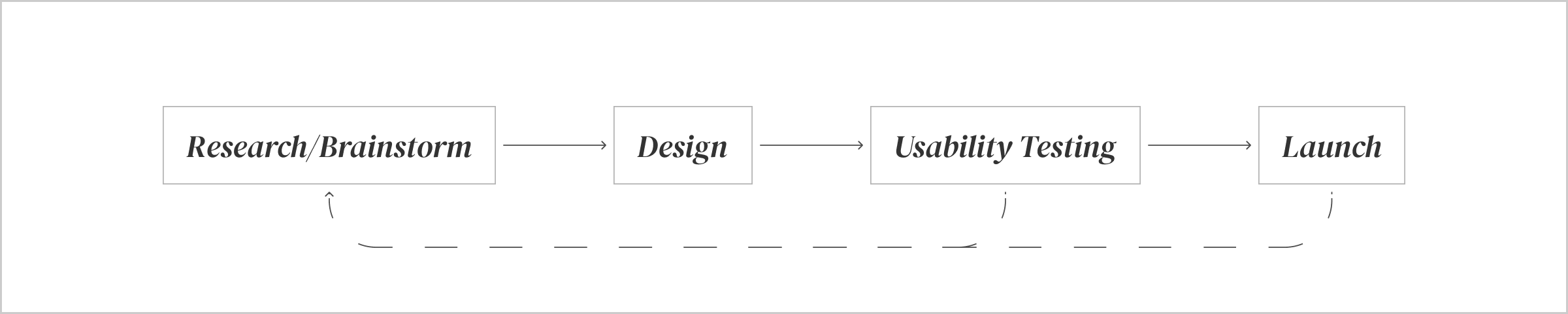
Generally, during research, we benchmark other platforms to come up with new solutions and ideas. This gives us a direct validation as to why something might also work in our case, basis how similar the context/environment for that feature lies on our platform. Even though we do get direct validation, the user base and consequently their behaviour varies from one platform to another. On the other hand, we brainstorm and come up with unique solutions which are completely new and hence never been validated.
After the solution is designed, in cases when we do decide to carry out usability testing, we screen a small group of participants, script our interviews and questions, and test the designs to learn their behaviour. This is a good way to quickly validate the solution in the final stages of design without incurring any product development costs. However, usability testing similar to A/B testing is prone to errors from confirmation bias of the interviewer to attitude polarisation of the interviewee, among other things. Additionally, the data that is collected at the end of the test is qualitative. We get great learnings out of this session on what is working and what is not, and how the user behaves. But the data set that we will have at the end of it will be too small, with anomalies that stand out. And as a result, it becomes difficult to always accurately predict the outcome at scale.
We also have to keep in mind that the usability testing session is conducted in a closely controlled environment with a closed-off flow. How the entire app is perceived as a whole and its consequent effects on a certain feature, and vice-versa cannot be tested in a usability testing session.
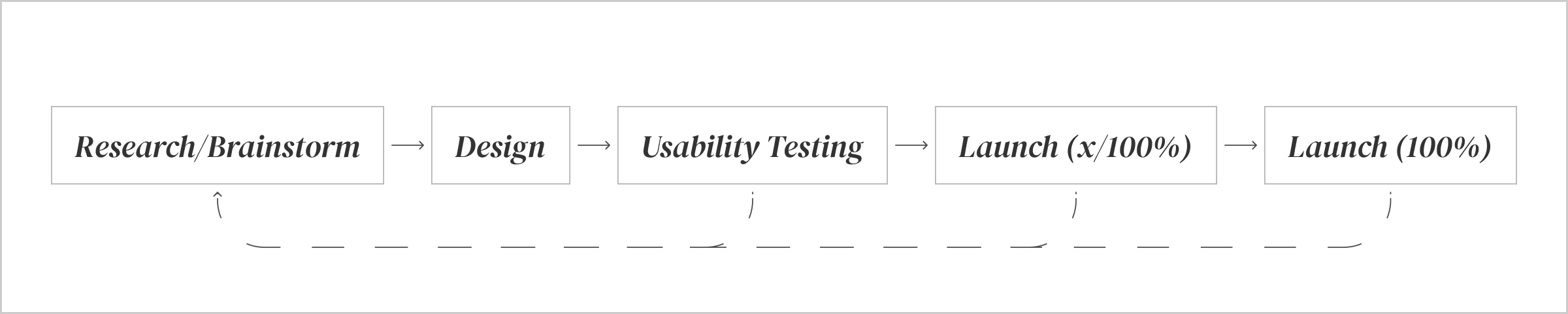
With experimentation, we add one more feedback loop in the product design process. If experiments are run correctly, and all variables are taken into consideration, quantitative data that is collected from this can be as effective to understand users preferences and behaviour. Though, the efforts required in running these experiments are the same as developing a full-fledged feature, with experimentation we can reduce the risks mentioned in the Introduction. Once we see that the expected metric is a positive coefficient, we can increase the rollout to another segment of users, and we keep measuring and keep rolling out to more users until we launch it to 100% of the users.
When to do what
Although the ideal way is to validate the hypothesis at every stage of the design process, it is impossible for all launches. For this, we must understand when to carry out just the usability testing or just launch it as an experiment or what are the ideal conditions for doing both. Generally, the validation comes down to the product/feature stage:
The feature does not exist on the platform
Hypothesise → Usability Testing → Controlled Launch (Single Variant)
At this stage, we are not even sure how users will react to the new feature/product. Therefore, it is of utmost importance that we do a Usability Testing session to understand users reactions, test the UX of the design and validate the business hypothesis. In this case, since we are introducing a new feature, it’s best we release it as a controlled roll-out to avoid the risks mentioned in the Introduction. In the case of smaller changes and feature add-ons, which are common practices in the industry and can be validated by benchmarking on most platforms, usability testing, and in some cases even controlled launches can be skipped depending on the urgency of the launch.
The feature exists on the platform
Hypothesise → Controlled Launch (Multi Variants)
At this stage, we already have the feature launched on our platform. If the correct process was followed in product designing, developing and tracking we might already have enough qualitative and quantitative data to understand user behaviour and analytics to base our hypothesis for an experiment. As a result, at this stage, we can do small tweaks to experiment with variants (one of them can be an existing design) to move the desired metric.
Hypothesis Template
- The hypothesis is to _____________
- We think this hypothesis will come true because _____________
- The variations that we need to run are _____________
- By running this as an experiment we will be able to measure the _______________. The existing data for the last 30 days for this is _____________
- We need to test this hypothesis on users who _____________
- This experiment might also change a few secondary metric(s) which are ___________. The existing data for secondary metrics in the last 30 days for this is(are) _____________
- This needs to be run as an Adobe Target experiment because _____________
- The external variables that can affect this experiment are _____________
- Link to PRD <>
Example
- The hypothesis is to <Add an order summary page before placing an order>,
- We think this hypothesis will come true because <we have learned from user research interviews that most orders that are cancelled have late dispatch dates; information which is shown to users on email after placing the order>.
- The variations that we need to run are <Default vs Additional Summary Page>.
- By running this as an experiment we will be able to measure the <decrease in the order cancellation rate>. The existing data for the last 30 days for < 21% of all orders placed>.
- We need to test this hypothesis on users who <have placed more than 3 orders in the last month>.
- This experiment might also change a few secondary metric(s) which are <cart abandonment/drop-offs, as we are adding one screen in the user's journey>. The existing data for secondary metrics in the last 30 days is(are) <cart abandonment is 63% conversion from “address” to “payment” screen on Android and iOS, aggregated>.
- This needs to be run as an Adobe Target experiment because <drop-offs and cancellation rate cannot be simulated and tested in a usability testing session>.
- The external variables that can affect this experiment are <Limited time discounts campaign might decrease cancellation rate>.
- Link to PRD <www.domain.com/slug1/.../slugn>
Checklist for Variant Testing
- There is only a single difference between the two variants.
- Feature/component is localised (is not reused throughout the product) and the feature doesn't have any large external dependencies.
- The cost of developing the feature and running the experiment is lower than the rewards you will get out of it.
- The sample size of users is large enough to successfully test the hypothesis.
- No other experiment is currently being run on the same component/feature.

Tata CLiQ
Sr. Product Designer
Read more about my work at Tata CLiQ